

See and Secure AI
Traceforce for MSPs is on-device AI security for managed service providers. It shows you the AI apps, accounts, agents and connectors on the computers you manage, scores the risk, and puts controls in place when each client is ready. PORT1 runs the official Traceforce channel for MSPs and MSSPs.
- Official Traceforce MSP/MSSP channel
- ISO 27001 certified
- SOC 2 Type II
- Month to month, no minimums
What does Traceforce do for MSPs?
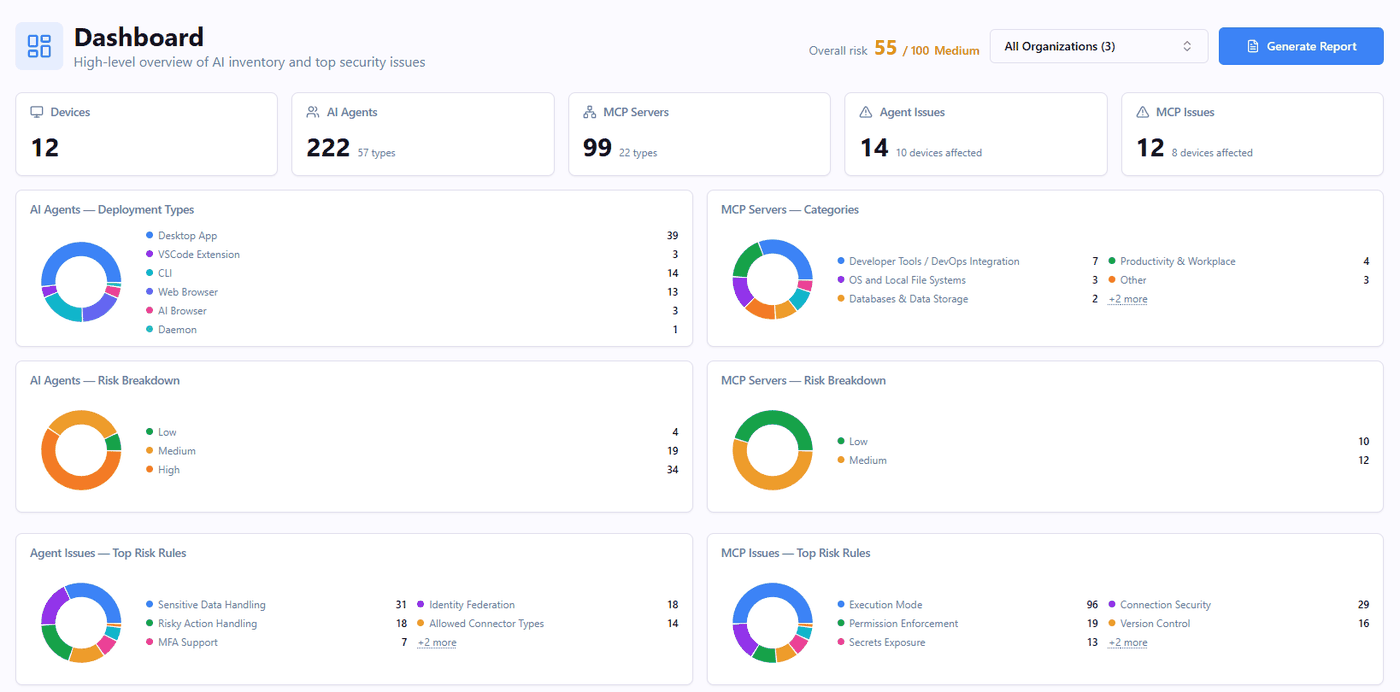
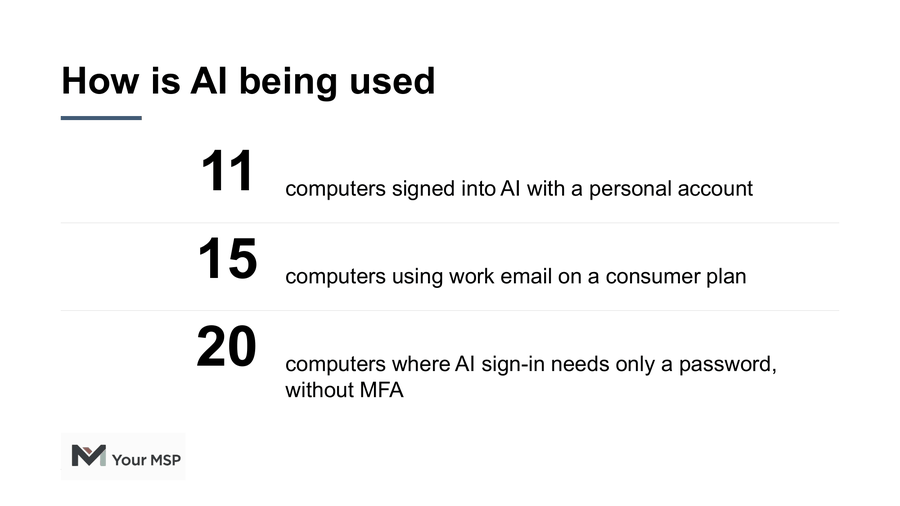
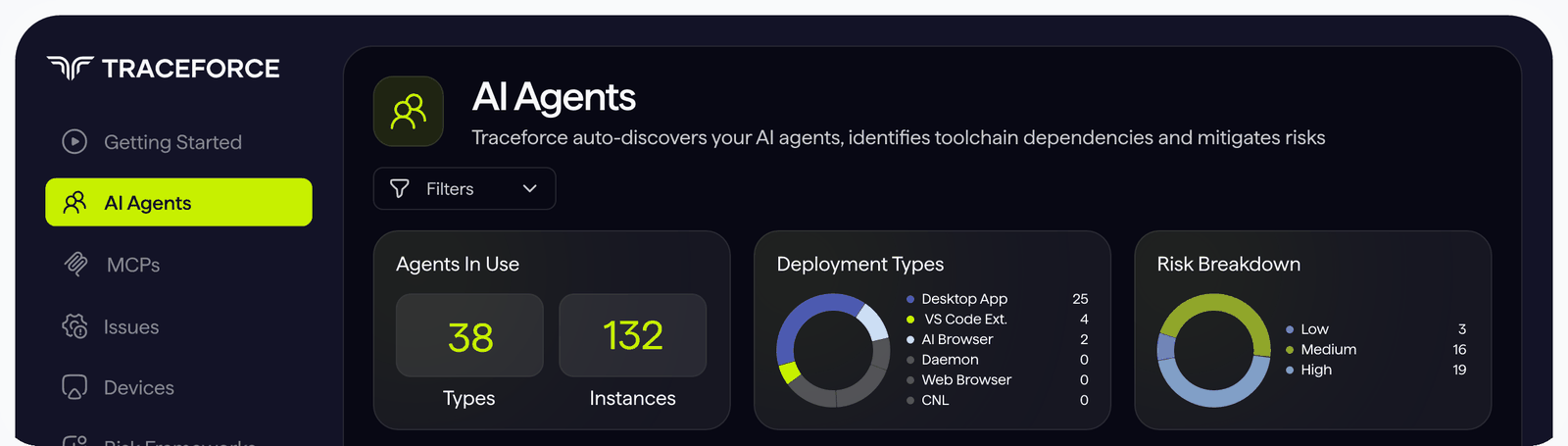
Traceforce finds the AI running on each computer you manage, scores the risk, flags what needs fixing and enforces the policies you agree on with each client. It adds the AI layer to your stack: what's running, who's signed in and on which account, what's going into it, and what it's allowed to do.
The agent
A lightweight agent on each Windows and Mac computer. It sees desktop AI apps, coding assistants, IDE extensions, command-line tools, local models, and the MCP servers and connectors they use.
The browser extension
Covers AI in Chrome and Edge. It sees which account someone signed in with, what plan they're on, and when sensitive information goes into a conversation.
The Atlas registry
Every AI tool and connector Traceforce finds is checked against Atlas, Traceforce's library of security ratings for 100+ AI agents and 800+ MCP servers and connectors. Scores run from 0 to 100 and map to NIST 800-53.
1 console for every client
Each client is its own organization. Switch between them, or see every client together on 1 dashboard.
Traceforce works alongside your EDR, email security and DLP. They each watch their own layer, and Traceforce covers the AI layer.
Can Traceforce block personal ChatGPT and Claude accounts?
Yes, when they're signed in with a personal email. A Traceforce policy can block sign-ins to supported AI tools like ChatGPT and Claude when the email isn't on the client's company domain, like a personal Gmail account. The company domains are set when the client's organization is set up. If someone opens a personal plan with their work email, Traceforce flags it so you can move them to the company plan. It also shows the plan behind each AI account, from free and personal to business and enterprise.
Can Traceforce catch passwords and customer data going into AI?
Yes. Traceforce detects passwords, API keys and other credentials, financial and identity details like Social Security and card numbers, and contact details going into supported AI tools. A policy can warn the person or block it in ChatGPT, Claude, Microsoft Copilot and the coding assistants Claude Code, Cursor, GitHub Copilot, Codex and Windsurf. What people type isn't kept by default. Traceforce records that it happened and where.
Can Traceforce secure AI coding agents and MCP servers?
Yes. Traceforce finds every MCP server and connector in use and checks how it signs in, whether it can read, write or delete, where it runs, and whether secrets sit in plain text. On supported coding agents like Claude Code, it catches risky actions through shell commands and MCP tools before they run, and a policy can block the action, require approval or report it. A risky delete through one connector can be blocked while the rest of the tool keeps working.
Why are MSPs adding Traceforce to their standard security stack?
AI is the newest layer on every computer you manage, and the rest of your stack wasn't built to see it. Every tool in your standard stack earned its place the same way. A new kind of risk appeared, the tools you had weren't built to watch it, and a new layer went in, first at a few clients and then everywhere. That's why a lot of MSPs are adding Traceforce to every managed computer at every client.
Priced like the rest of your stack
Per endpoint, month to month, with no minimums. MSPs that add Traceforce to every managed computer get our full-stack pricing, whatever their size. You'll see pricing when you sign up or in a partner meeting.
A service that keeps going
Some findings get fixed once. Others need watching every month as people pick up new tools and vendors ship updates. Watching it, adjusting controls and reporting back is recurring work, and recurring revenue.
Your clients already pay for AI
They pay for ChatGPT, Claude and Copilot because they expect a return. Traceforce is how you help them protect it and get more out of AI, safely.
Source: Kaseya 2026 State of the MSP Report, 1,061 MSPs.
My clients aren't asking for AI security. Should I still offer it?
Yes. Whether or not your clients are asking, they all need to know what AI is running on their systems, and that's why MSPs are using Traceforce to run AI Risk Assessments. Leadership wants to know what their people are doing with AI, and the assessment gives you something concrete to bring them: what's in use, who's signed in and what it can reach.
How does the free AI Risk Assessment work?
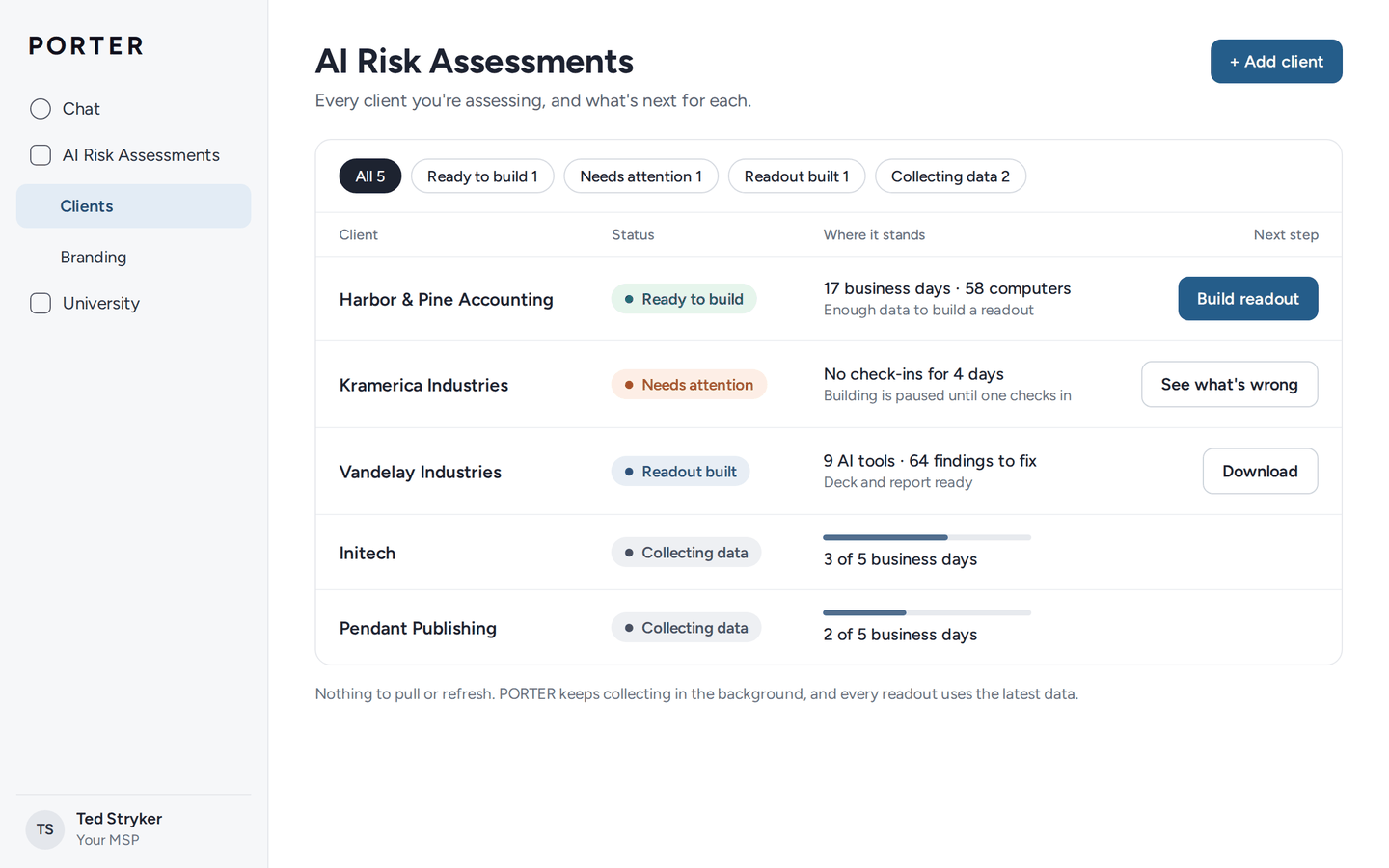
An AI Risk Assessment is a free, report-only look at the AI running on a client's computers. You deploy Traceforce, let it run for 1 to 2 weeks, and PORTER builds a presentation and report in your branding for the client meeting. Most assessments go from deployment to readout in 2 to 3 weeks.
Deploy
Push the agent and browser extension through your RMM or MDM. The first inventory comes in within about an hour.
Let it run
Give it 1 to 2 weeks. Everything reports to you only, so nothing is blocked and nobody is interrupted.
Build the readout
Connect the client in PORTER and download the presentation and report, in your branding.
Meet the client
Walk them through what you found, and book the policies and controls session before you leave.
30 days free for every client
Each client's first 30 days are free, starting when the first computer checks in. It's a 1-time free period for each company, with no obligation. If a client doesn't move forward, remove Traceforce within the 30 days and there's no charge.
It works with prospects too, and it's 1 of the easiest yeses you'll get from a business you don't work with yet. For most MSPs, that's the hard part: 71% say acquiring new customers is their biggest challenge (Kaseya 2026 State of the MSP Report).
What does an AI Risk Assessment cover?
Every finding comes from the client's own computers, in 3 groups: who's using AI and how, what AI is allowed to do, and where information is going.
- The AI tools in use: desktop apps, browser tools, AI browsers, coding assistants, IDE extensions, command-line tools and local models
- Who's signed in, on which account and plan, and whether work email is on a consumer plan
- AI sign-ins with no MFA, and whether what's typed is used to train someone else's AI
- MCP servers and connectors, and whether they can change or delete data
- Passwords, keys and personal information going into AI, and secrets sitting in plain text in AI configuration files
- A 0 to 100 risk score for each tool and connector, mapped to NIST 800-53, with remediation guidance
What does the client see?
A presentation and a report in your branding, built by PORTER from the client's own data. The readout opens with AI as an opportunity for the business, shows what's actually happening, and ends with a clear next step: your managed service.
The presentation
6 to 13 slides for about 20 minutes, with the full spoken script in the speaker notes. It names the AI tools, never the people, and recommends your service by name.
The report
An editable Word document you send as a PDF after the meeting. Part 1 is a letter-style summary for leadership. Part 2 covers every tool, connection and finding for whoever handles IT, with remediation guidance and exactly what was and wasn't collected.
Your brand throughout
Your logo, colors and service name. In the readout, Traceforce appears only as "the platform," and sections with nothing in them drop out, so a lighter assessment gets a shorter report.
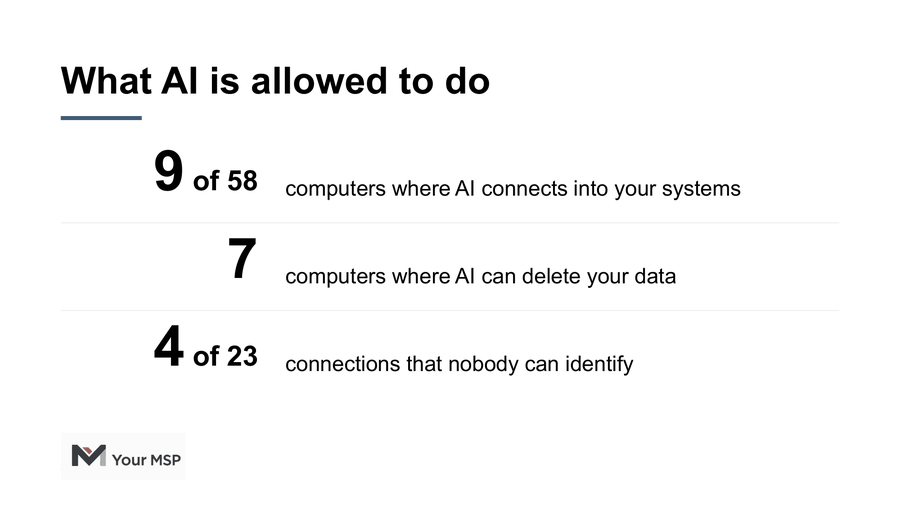
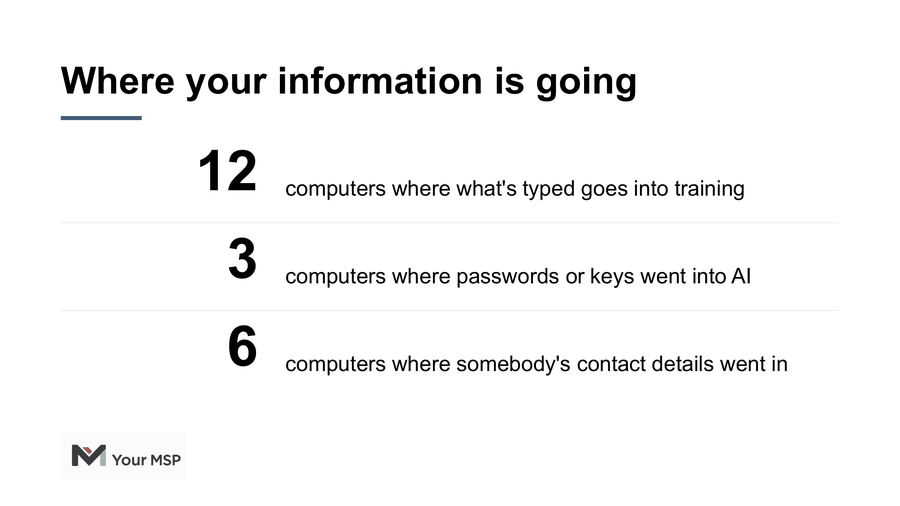
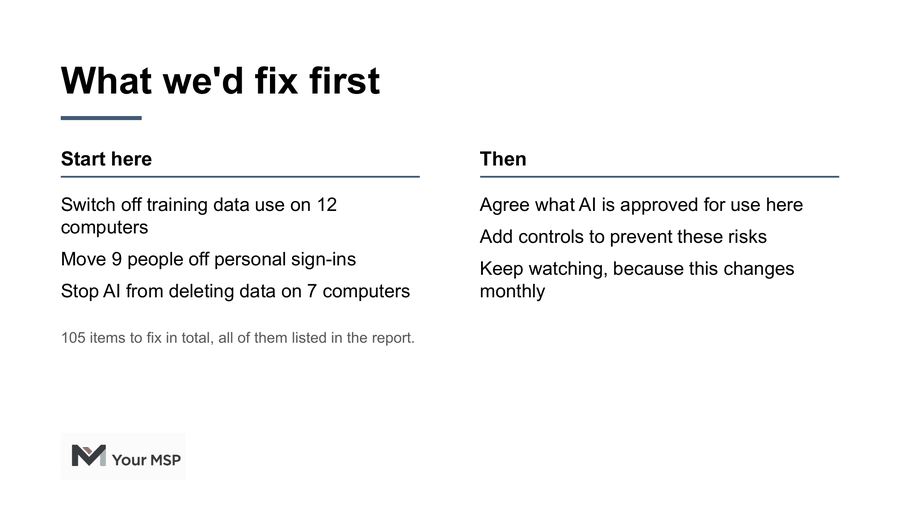
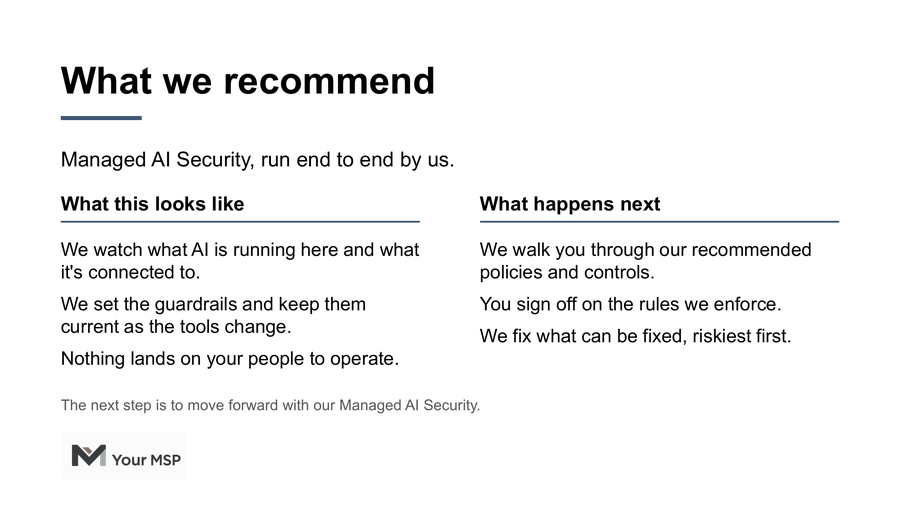
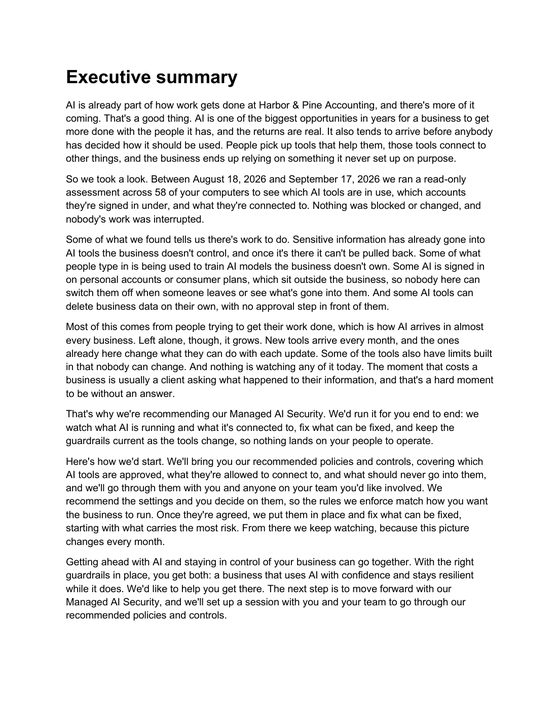
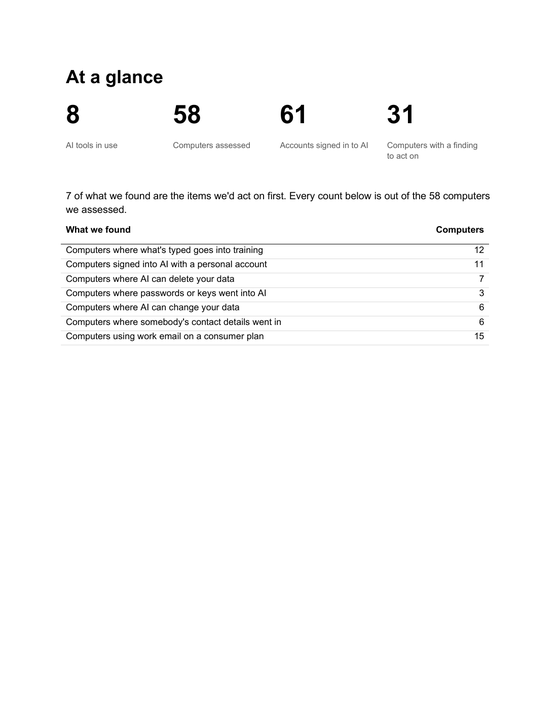
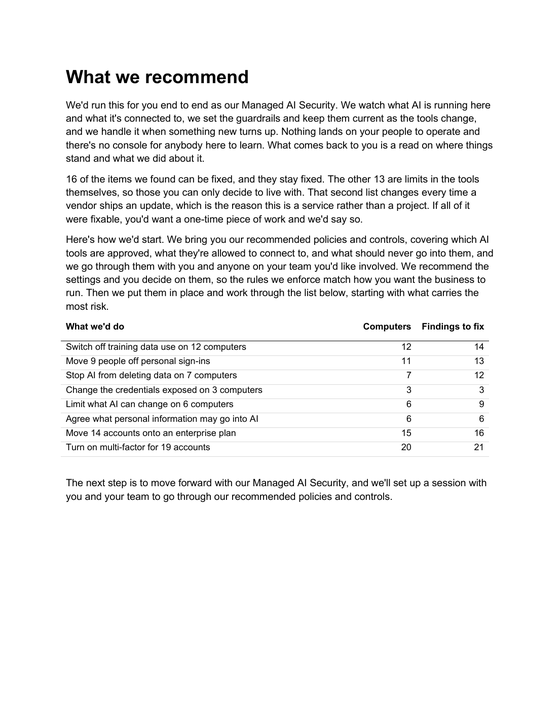
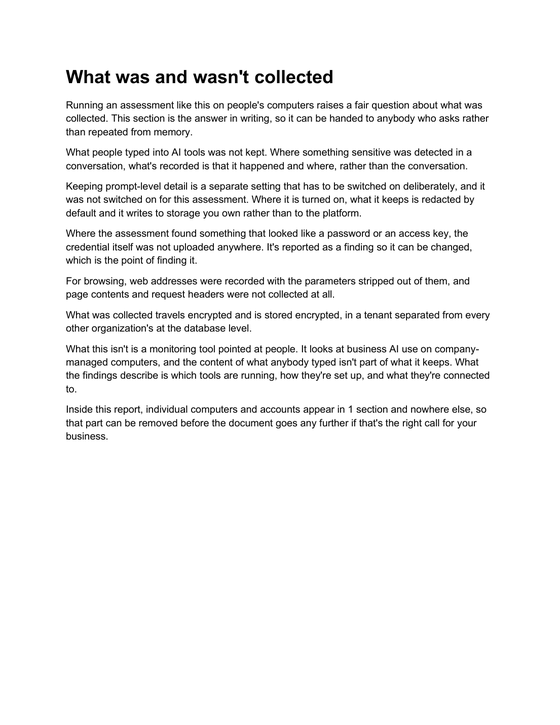
Sample slides from a PORTER readout for Harbor & Pine Accounting, a fictional firm. "Your MSP" stands in for your brand.
How do MSPs turn the findings into a managed service?
During an assessment, Traceforce only observes. When the client's ready, the same agent starts enforcing the policies you agree on, so there's nothing new to deploy. Each control can block, warn or report.
Traceforce enforces
- Blocks sign-ins to AI tools like ChatGPT and Claude with anything other than a company email
- Warns or blocks before passwords, keys or personal information go into supported AI tools
- Stops AI coding agents from taking risky actions, like deleting data, before they run
Traceforce flags, you fix
- Training switched on
- MFA switched off
- Work email on consumer plans
- AI connections with write or delete access
- Passwords and keys in plain text in AI configuration files
You keep watching
- Limits built into the AI tools themselves
- New AI tools as they arrive
- Changes after vendor updates
This is the part that makes it a service.
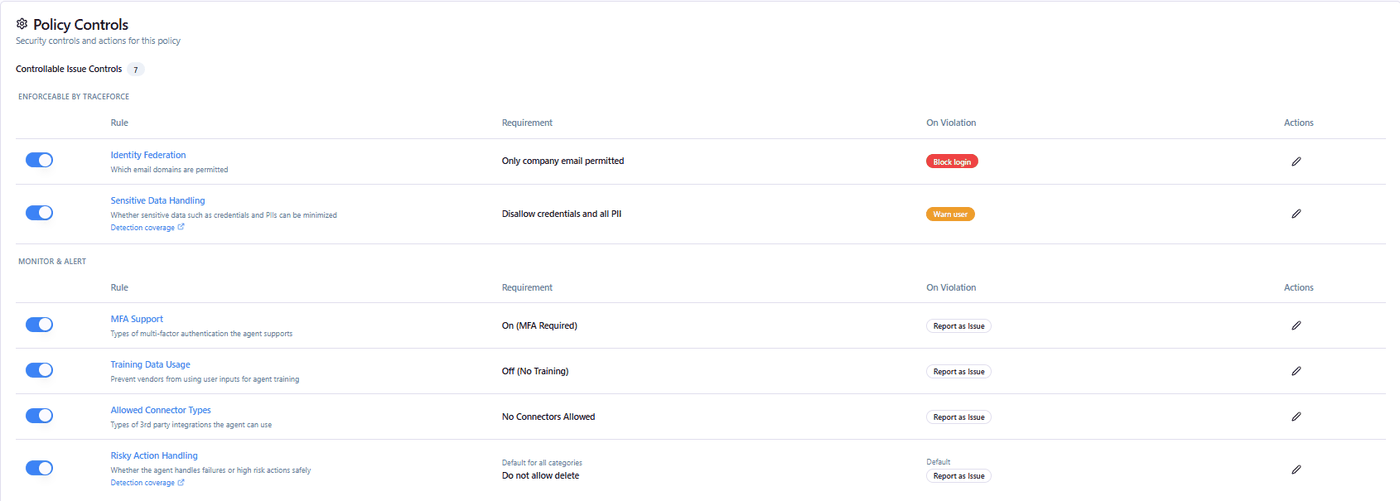
Roll it out like anything else. Bring recommended policies to a policies and controls session, covering which AI tools are approved, what they can connect to and what should never go into them. The client decides, and you turn controls on for a pilot group first, 1 at a time, so nothing surprises anybody.
A policy says what's allowed, controls make it stick, and monitoring shows whether it's working.
What do partners get with PORTER?
PORTER is PORT1's partner platform, and every Traceforce partner gets it. It builds your client readouts, answers your team's questions 24x7, and trains your engineers on Traceforce.
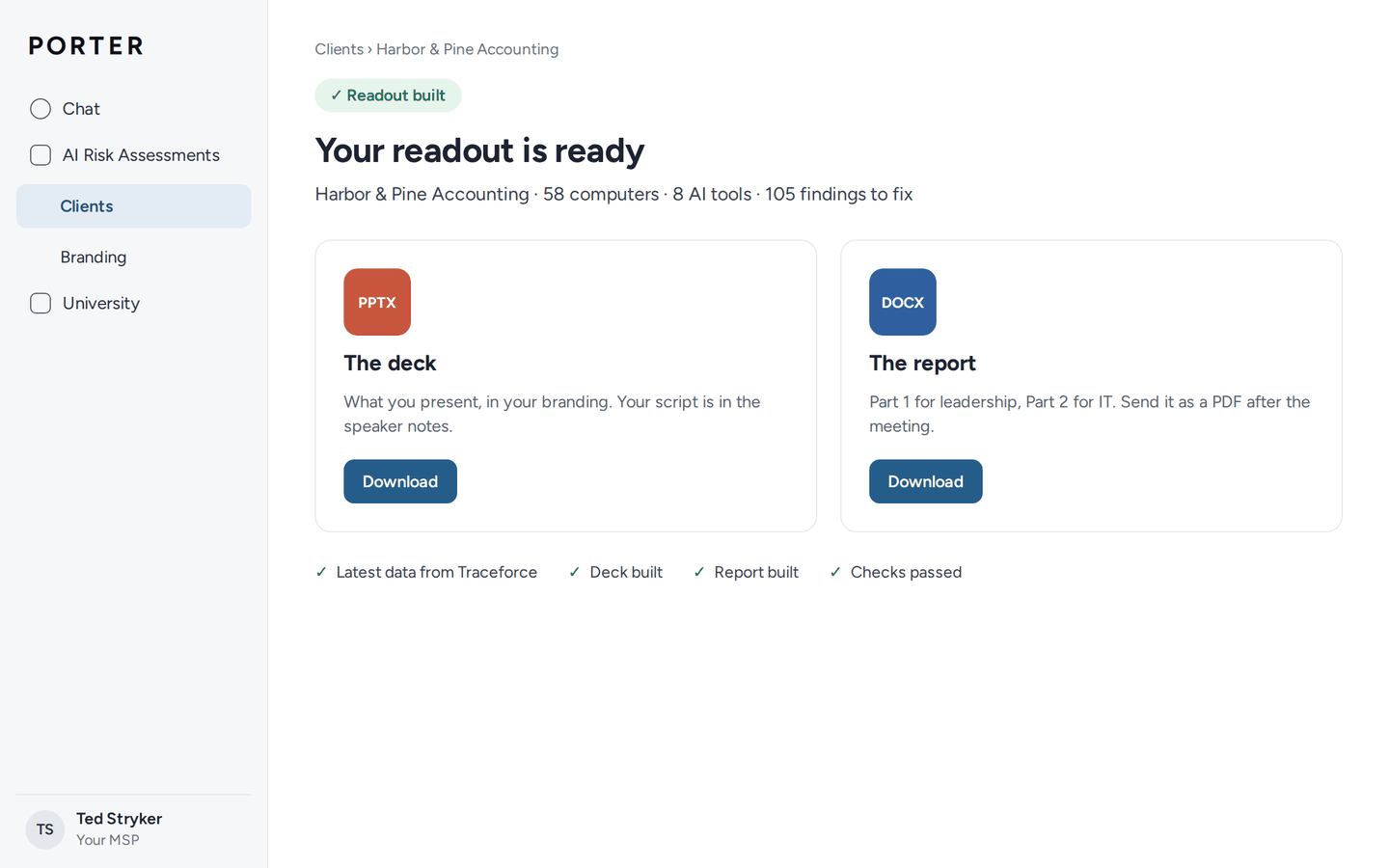
AI Risk Assessments
Connect a client, pull the Traceforce data, and download a presentation and report in your branding in minutes. Set your logo, colors and service name once, and every readout carries them.
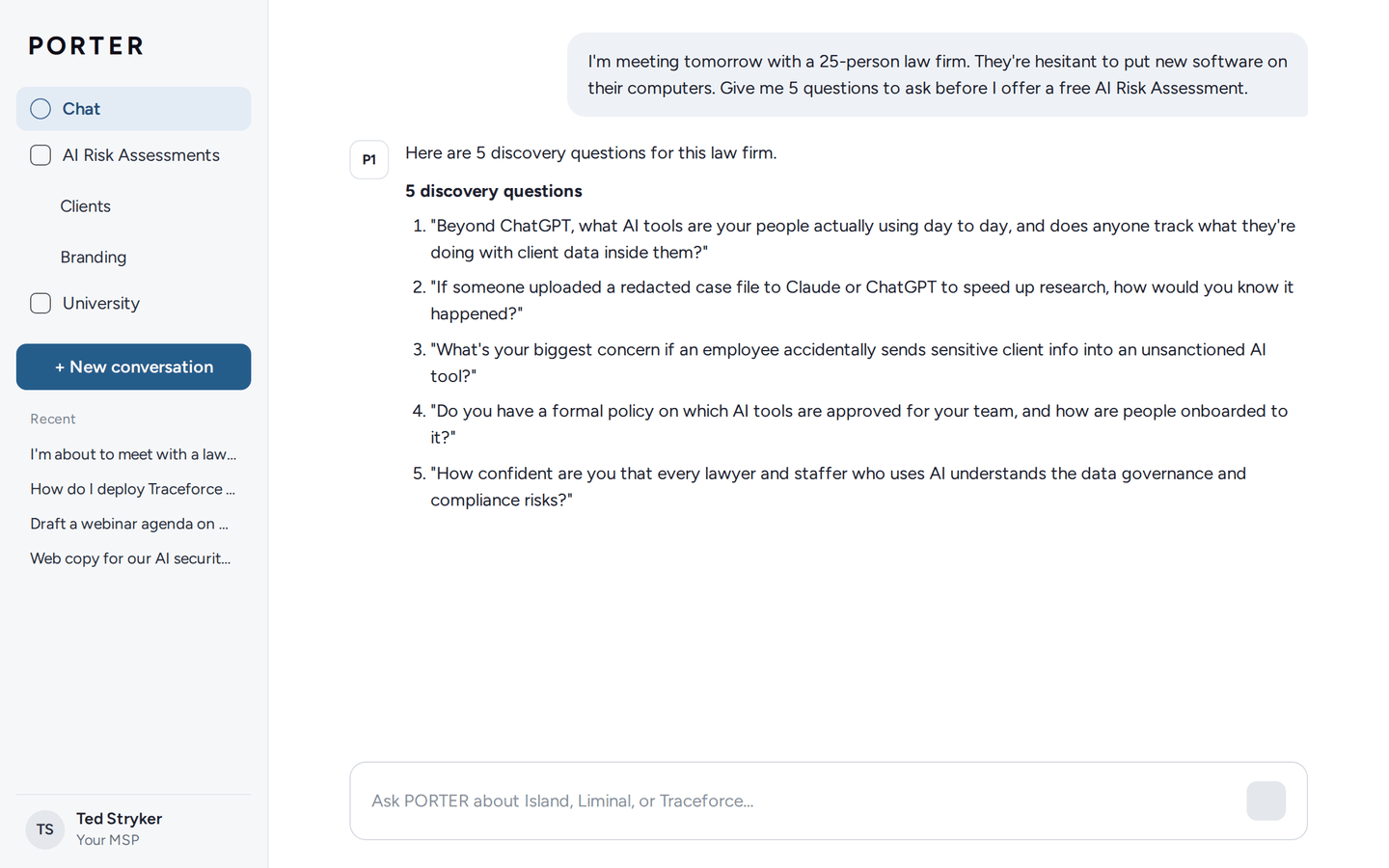
PORTER Chat
24x7 help for your sales, marketing and engineering teams. Ask it to prep you for a meeting with a hesitant law firm, draft an agenda for a client webinar, write web copy for your own AI security service, or explain what a specific finding means.
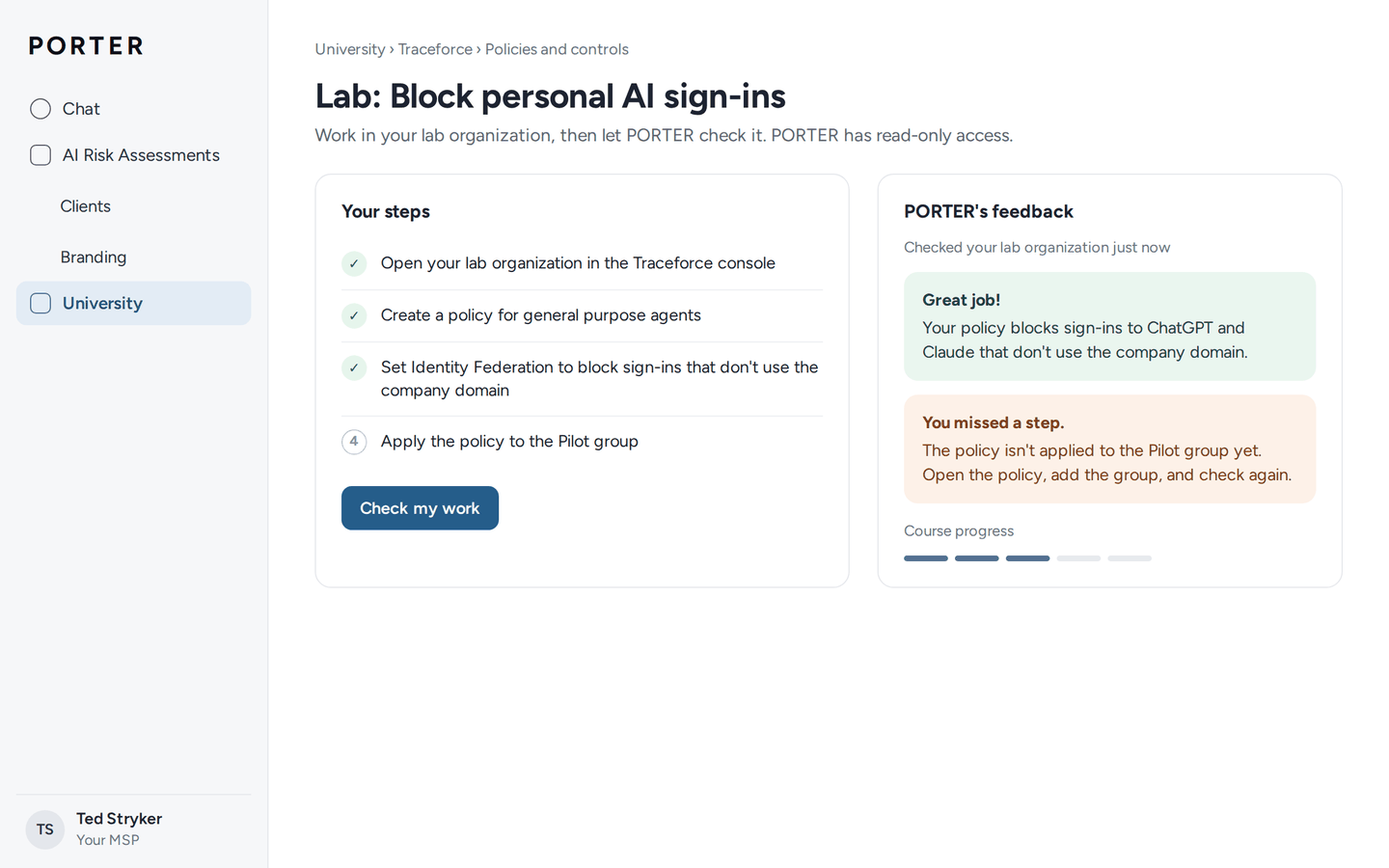
PORTER University
Technical courses and quizzes, starting with Traceforce. Hands-on labs connect read-only to a live Traceforce organization through its API, and PORTER checks your work and gives feedback on each step.
Designed by our partners, delivered by PORT1.
How do you deploy Traceforce across client computers?
Through the RMM or MDM you already use. Windows installs with a single script that puts the agent in place and sets up the browser extension for Chrome and Edge, and Macs deploy through your MDM. The agent reports in within minutes, the first inventory lands within about an hour, and there's nothing for users to do.
Our step-by-step onboarding guide covers the most popular RMMs and MDMs, and clean removal if a client doesn't move forward. If you run something else, we'll help you get it done.
- Computers
- Windows 10 and 11, and macOS on Apple Silicon and Intel
- Browsers
- Current versions of Chrome and Edge
- RMM and MDM
- NinjaOne, Datto RMM, ConnectWise Automate, ConnectWise RMM, N-able N-central, N-able N-sight, Atera, Action1, Syncro, Microsoft Intune, Jamf Pro, JumpCloud, Google Workspace and more
- AI tools
- ChatGPT, Claude, Gemini, Microsoft 365 Copilot, Perplexity, GitHub Copilot, Cursor, Claude Code, Windsurf, Codex, Ollama, LM Studio and more
- Every client
- 1 console, each client its own organization, and only you can get in by default
- Client access
- Optional single sign-on for a client's IT team with Entra ID, Okta or OneLogin
- API
- A REST API with the same data and controls as the console, for your SIEM, ticketing or your own tools
Why get Traceforce through PORT1?
PORT1 runs the official Traceforce channel for MSPs and MSSPs. We're a channel-only company, founded by MSPs and built for MSPs, and we work alongside your team from the first client meeting on.
We help you sell it
Talk tracks, demos, and we'll join your client meetings whenever you want us there.
We help you deploy it
Onboarding, a step-by-step deployment guide and hands-on help with your first clients.
1 place to go
Your clients come to you, you come to us through PORTER or PORT1 support, and we take care of anything that needs Traceforce.
Simple terms
No minimums and no long-term contracts, month to month. The partner agreement is free, with no purchase commitment.
Your feedback reaches the product
What partners tell us goes straight to Traceforce's product team.
Is Traceforce secure and compliant?
Traceforce is ISO 27001 certified, holds a SOC 2 Type II report, and signs a BAA directly with healthcare customers that need one. Analysis happens on the computer, and only metadata and findings go to the platform.
- ISO 27001 certified
- SOC 2 Type II
- HIPAA internal assessment, BAA available
What people type isn't kept by default.
If a client turns on conversation logging, it's redacted by default and written to storage the client owns in AWS, Google Cloud or Azure.
Credentials stay put.
A password or key found on a computer is reported so it can be changed, and never uploaded.
Browsing is kept to a minimum.
Web addresses are recorded with their parameters stripped, and page contents and request headers aren't collected.
Encrypted and isolated.
Hosted on AWS in the US, encrypted in transit and at rest, with every organization separated at the database level.
Your sign-in rules apply.
Console sign-in runs through your identity provider, so your MFA and conditional access apply to every sign-in.
Retention.
Usage metadata is kept for 12 months by default, and customers can ask for it to be deleted.
Security and Compliance Overview
How Traceforce handles data, who can reach it, and the independent assurance behind it.
The full security package
The SOC 2 Type II report, architecture documentation and HIPAA assessment, shared once an NDA or partner agreement is in place.
Traceforce for MSPs FAQ
What is Traceforce for MSPs?
Traceforce for MSPs is the official Traceforce channel for MSPs and MSSPs, run by PORT1. It gives you on-device AI security for every client you manage, a free AI Risk Assessment to start with, and PORTER to build the client readout.
What does an AI Risk Assessment cost?
Nothing. Every company's first 30 days are free, once per company, with no obligation. If a client doesn't move forward, remove Traceforce within the 30 days and there's no charge.
How long does an AI Risk Assessment take?
Setting up a client takes minutes, and the first inventory comes in within about an hour of deploying. Let it run for 1 to 2 weeks. Most assessments go from deployment to readout in 2 to 3 weeks, well inside the free 30 days.
How is Traceforce priced?
Per endpoint, month to month, with no minimums. You'll see pricing when you sign up or in a partner meeting. MSPs that add Traceforce to every managed computer get our full-stack pricing, whatever their size.
Is there a minimum or a long-term contract?
No minimums and no long-term contracts. It's month to month, and you can start with a single client.
Is Traceforce multi-tenant?
Yes. Each client is its own organization in 1 console, separated at the database level. You can switch between clients or see them all together, and by default only you can get into a client's organization.
Does Traceforce replace my EDR or DLP?
No. It sits alongside them. Your EDR, DLP and email security each watch their own layer, and Traceforce covers the AI layer: the AI apps, accounts, agents and connectors on each computer.
How is Traceforce different from browser-only AI security tools?
Traceforce covers the browser and the AI outside it on Windows and Mac: desktop AI apps, coding assistants, IDE extensions, command-line tools, local models and the MCP servers they connect to. It can also stop risky actions by coding agents on the computer before they run.
How is Traceforce different from Liminal?
They do different jobs. Traceforce runs the AI Risk Assessment and ongoing governance across the AI tools on each computer. Liminal gives your clients a dedicated, secure AI workspace with data protection and cost control.
Can I run an assessment for a prospect?
Yes, and it's 1 of the best ways to start a new relationship. How you deploy it is up to you and the prospect.
Do I have to run an assessment first?
No. Some MSPs add Traceforce to every managed computer from day 1. Others start with a free assessment at 1 client and go from there. Either way, each client's first 30 days are free.
Will my client see the Traceforce name?
The readout carries your brand and your service name and refers to "the platform." The agent and browser extension on their computers carry the Traceforce name.
Will it slow computers down or interrupt anyone?
The agent is lightweight. During an assessment it only observes, so nothing is blocked and nobody is interrupted. There's nothing for users to install or sign into.
Are AI conversations stored?
Not by default. Traceforce analyzes AI use on the computer and sends only metadata and findings to the platform. Conversation logging is optional, redacted by default, and writes to storage the client owns.
Does Traceforce support HIPAA, and will it sign a BAA?
Traceforce signs a BAA directly with healthcare customers that need one. It has completed an internal assessment against the HIPAA Security Rule and Breach Notification Rule, available under NDA. The Security and Compliance Overview has the details.
Can a client's IT team have their own access?
Yes. Add single sign-on with Entra ID, Okta or OneLogin, and they get their own view of their organization.
What if a client already pays for an enterprise AI plan?
Traceforce shows who's using it and who's still on a personal or consumer plan alongside it. The readout even calls out what's already set up well.
My clients won't pay for more security. How do I position it?
They're already paying for AI. They pay for ChatGPT, Claude and Copilot because they expect a return, and Traceforce is how you help them protect it and get more out of AI, safely.
Do I need to be an AI expert to sell it?
No. PORTER writes the readout script in plain business language, PORTER Chat answers your questions 24x7, and PORT1 will join the client meeting if you'd like.
What do I need to get started?
Fill out the signup form, sign the free partner agreement, add billing details and set up sign-in. Your Traceforce console and PORTER are usually ready within a few hours.
How do I get started?
Sign up online, and you're usually in your Traceforce console and PORTER within a few hours.
- Fill out the form.
- Sign the partner agreement. It's free, with no purchase commitment.
- Add billing details. Nothing's charged for a client until its free 30 days are up.
- Set up sign-in for your Traceforce console.
- Get your console and PORTER, then deploy your first client.
Rather talk it through first? Book a meeting with our team.
Traceforce for MSPs partner guide
Everything MSPs need to know about Traceforce, the free AI Risk Assessment and making AI security part of your standard stack.
Client white paper: You Can't Secure the AI You Can't See
A plain-language paper you can share with clients.
Features, pricing and program details can change without notice, and everything here is subject to the PORT1 Partner Agreement.