


IslandOS
A zero-trust OS that runs only what users need
IslandOS combines Island Browser with IGEL OS to deliver a locked-down, cloud-first workspace. IGEL OS is a read-only, non-persistent endpoint operating system that keeps data off the disk, while Island adds access controls and DLP in the browser where users work. Both are centrally managed: IGEL UMS for the OS and the Island Management Console for the browser, so you can administer at scale with ease.
Learn more about the combined approach in the IGEL + Island solution brief
What is IslandOS
IslandOS is a turnkey option for MSPs that combines Island Browser with IGEL OS, a secure-by-design thin client operating system. PORT1 provides hosted management for IGEL OS and you manage Island through Island’s console, giving you central, multi-tenant control across both environments without extra overhead.
Why MSPs choose IslandOS
IslandOS lets you replace heavy endpoints with a simple, secure workspace that is easier to run and easier to support.
Harden endpoints
A read-only OS that runs only Island Browser hardens endpoints and keeps data off the disk.
Extend hardware life
Keep devices useful for years longer rather than replacing on a 3-5 year cycle.
Replace product COGS and reduce labor burden
Shift tool costs off the endpoint and free time for higher-value work.
Grow monthly recurring revenue
Shift client spend from capex to a subscription with stronger margins. Offer Islandbooks as a service.
Users love it
Simple, fast, and familiar. PWAs feel like local apps and open in their own windows.
“Upgrading to IslandOS and selling Islandbooks turned periodic project revenue into recurring revenue. Clients save on hardware, we save on support, and our MRR went up a ton!”
— Jordan P., MSP Owner
Where IslandOS Fits
Users whose work runs in SaaS and Microsoft Office apps as PWAs
Cost-conscious clients who want to extend device life and reduce attack surface
Standardized, hardened endpoints for most users
USB boot for testing and POV; also helpful in specific BYOD or disaster recovery situations without touching the local disk
What Users Experience
Office apps as PWAs that open in their own windows and feel like local apps
Fast performance on low-spec hardware, new or old
The Island homepage acts like the desktop for a simple start to the workday
Works great for shared stations and shift work; join Wi-Fi, sign in with SSO, and get to work
How it Fits Your Model
Remove your endpoint stack and free support time with central, multi-tenant control
Offer devices as a monthly service (Islandbooks) with better margins
Reuse aging hardware or standardize on low-cost new devices with IslandOS
Help achieve compliance across common frameworks. Detailed mappings available on request
When to Choose Something Else
Work that requires locally installed desktop applications or thick client software such as CAD, advanced media, or certain legacy line-of-business tools
Workflows that depend on specialized local drivers or peripherals that require full Windows or macOS
For those users, stay on Windows or macOS and protect them with Island Browser or the Island Browser Extension.
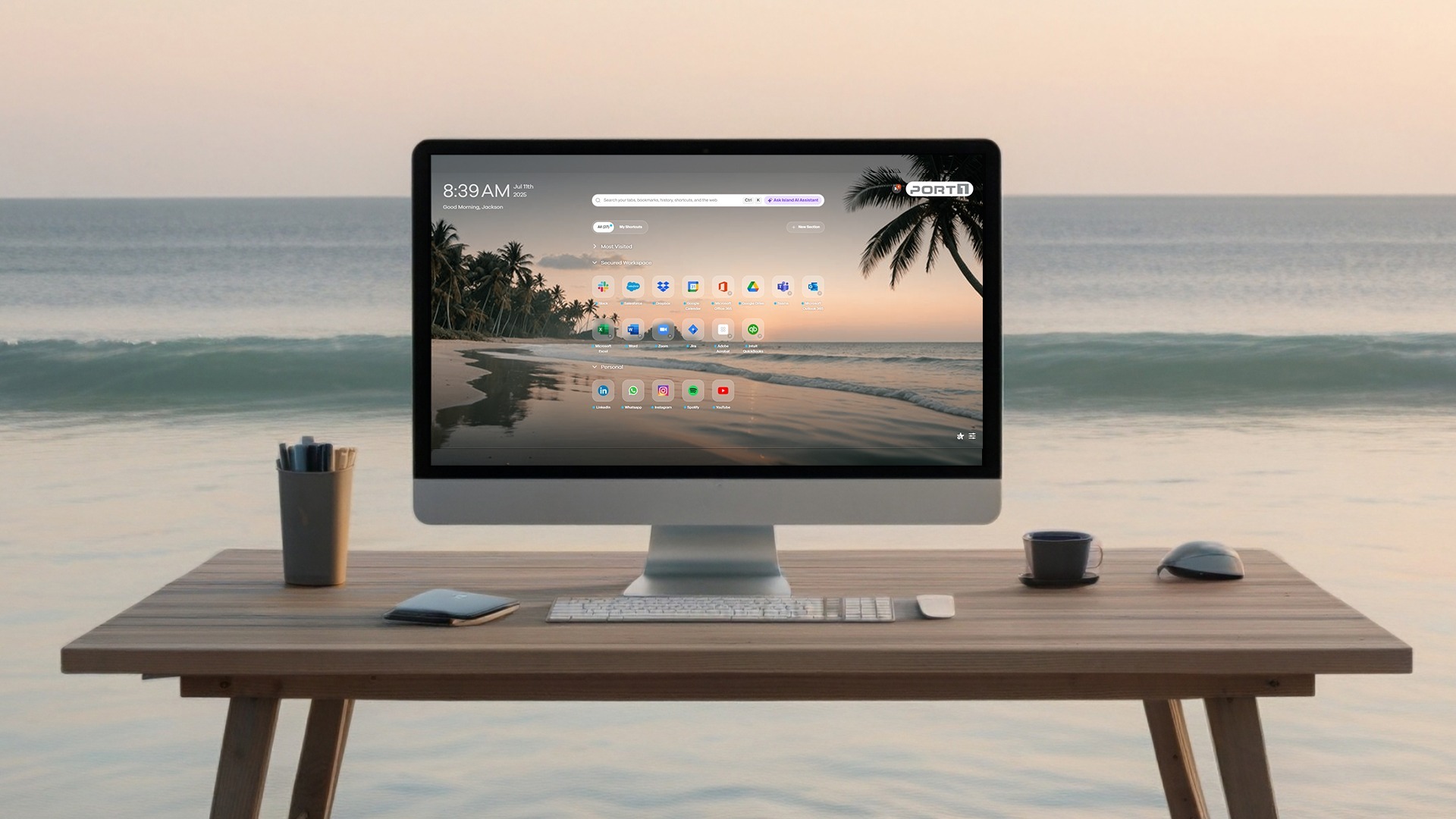
See Value in Three Steps
Request a test image
Run real workflows
Decide and deploy
We help every step: provisioning, homepage and PWA setup, pilot communications, findings summary, and client pitch materials.
How Rollout Works
You receive a bootable image that is ready to be placed on a USB drive for your installation.
Insert the USB drive into a device, boot it directly, and then sign in securely using SSO.
Island homepage and PWAs can be preconfigured, or templates provided for your whole team.
Product Selection Guide
Pick based on device trust and the level of control you need.

On managed devices, Island Browser is the preferred secure workspace for the full work experience. When a user must use a consumer browser, run the Island Browser Extension on that managed device for added depth. For unmanaged devices and contractors, use Island Browser to create a separate, work-only environment. If you prefer to issue or repurpose a dedicated device, consider IslandOS.
“We have clients who wouldn’t spend a penny on cybersecurity. Now we have protected their business without them spending a penny more. And that helps me sleep better at night.”
— Dan M., MSP Owner
Resources You Can Download
Learn more with one simple click.

If you’re tired of stacking tools just to keep up, realizing it’s a race that can’t be won...
.png?width=1270&height=800&name=673c5fabb7e06b3036afcc95_Frame%201707478752%20(5).png)